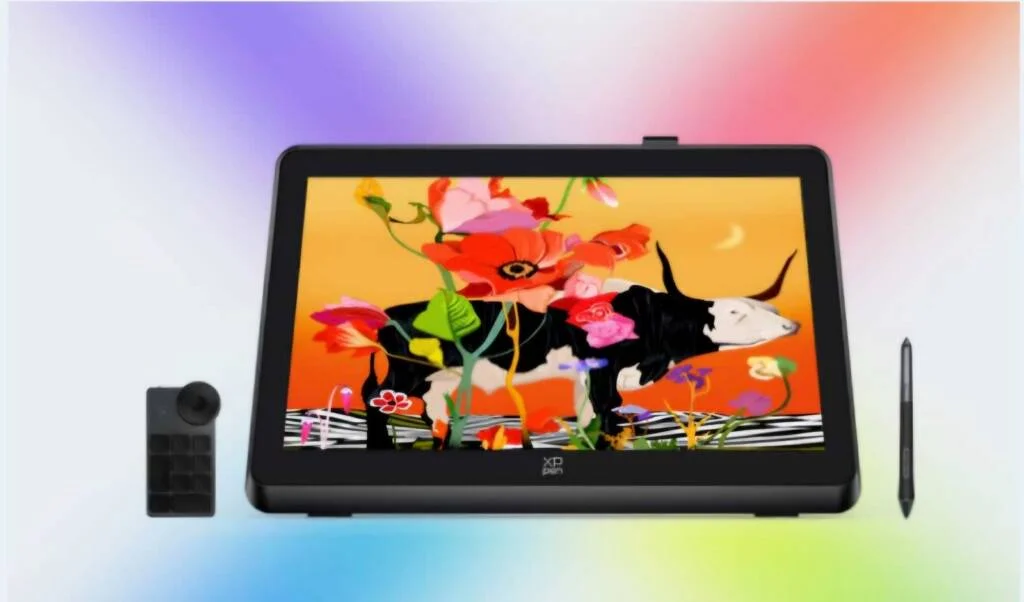

Digital artists seeking a large, simple, and high-performance tool will find a 22-inch drawing tablet perfect. Its big display, exact pen, and sophisticated capabilities make it ideal for graphic designs, animations, and thorough illustrations. Whether you are an expert or a novice, this guide will enable you to investigate the advantages, best choices, and how to select the appropriate 22-inch drawing tablet for your workflow.
Key Features of a 22-Inch Drawing Tablet
A 22-inch drawing tablet brings forward several remarkable features that digitally creative people will definitely want to use. Devices with a 22-inch drawing tablet display various essential features that boost their effectiveness and versatility.
● Large Display Area: These drawing tablets offer a sufficient 22-inch display area so artists can design intricate projects at their leisure. Digital artists find this drawing tablet particularly suitable for representing detailed illustrations along with producing animations and creating graphic designs.
● High Resolution: The drawing tablets with 22-inch displays bring Full HD and higher resolution to deliver sharp details for the user. Precise digital painting along with photo editing requires the high level of sharpness which these devices deliver.
● Color Accuracy: Most models deliver accurate color reproduction through their wide color spectrum span of either 99% Adobe RGB or sRGB which produces realistic and vivid image colors. Accurate color grading projects need this capability in particular.
● Pressure Sensitivity: A 22-inch drawing tablet features 8192 levels of pressure sensitivity which sets the industry standard to precisely control line thickness as well as opacity and shading.
● Tilt Support: The advanced tilt capabilities of this device mimic regular drawing instruments to make it simpler for users to create natural and flowing shading effects.
● Fully Laminated Display: Display technology with full lamination now appears in numerous 22-inch tablets because it reduces parallax beyond traditional displays and brings pen strokes precisely to their intended locations for better drawing quality.
● Customizable Shortcut Keys: Users can take advantage of the built-in programmable buttons or dials on tablets to reduce their workflow by selecting their most important tools and functions.
● Ergonomic Design: The larger size comes with a design that lets artists position it on adjustable stands or mounts to work comfortably for extended periods without discomfort.
● Connectivity Options: The connectivity features of most 22-inch drawing tablets include HDMI as well as USB-C and DisplayPort which makes them adaptable to various devices for use.
● Stylus Performance: The complementary stylus operates without batteries and remains lightweight which enables users to sketch with natural precision and without delay.
The combination of expansive surface area and modern functionality in 22-inch drawing tablets makes them suitable for artistic professionals together with recreational artists and creative designers. The included features both simplify user interactions and increase creativity rates substantially. Picking the correct 22 inch drawing tablet presents a substantial choice to all artists. Three top-notch digital drawing solutions exist which cater to different needs of the digital creator pool.
XPPen Artist Pro 22 (Gen 2)
For those needing professional functionality without breaking the bank, the XPPen Artist Pro 22 (Gen 2) is a great option.
● Perfect pen strokes depend on a fully laminated 21.5-inch display removing parallax.
● Perfect and lifelike colors are guaranteed with 99% Adobe RGB color fidelity.
● To replicate a natural drawing experience, the stylus has tilt support and 16384 pressure levels.
● Customizable shortcut keys improve the flow of work.
Ideal for both beginners and experts, it combines affordability and performance.
Wacom CI 22
A top-tier choice with outstanding build quality and dependability is the Wacom Cintiq 22.
● Large 21.5-inch, anti-glare display replicas conventional drawing sensation.
● Sharp and crisp images come from full HD resolution.
● Precision and control come from Wacom Pro Pen 2 with 8192 pressure levels.
● A natural, paper-like feel is produced by a textured screen surface.
Perfect for experts looking for a consistent and flawless drawing tool.
Monprice MP 22-inch Pen Display
A sensible choice with good performance for people on a budget is the Monoprice MP 22-Inch Pen Display.
● On a 21.5-inch screen, full HD resolution guarantees clear, finely detailed images.
● Consistent performance comes from the stylus with 8192 pressure levels.
● Perfect for enthusiasts or students investigating digital art, this is a basic yet useful tablet.
Those new to big drawing tablets will find it approachable at a reasonable price range.
How to Choose the Right 22-Inch Drawing Tablet?
If you pay close attention to the aspects most important for your job, choosing the ideal 22-inch drawing tablet is not difficult. The main elements to take into account while deciding are broken out here.
Display Quality
Any 22-inch drawing tablet starts with the display. Although the size is common, models differ in their color accuracy and resolution. To guarantee bright and clear images, seek at least Full HD resolution (1920 x 1080). Aim for a tablet with broad colour gamut coverage like 99% Adobe RGB or sRGB if you are working on assignments requiring exact colour grading, including illustrations or graphic design. Additionally crucial is a completely laminated screen as it minimises parallax and guarantees flawless drawing experience.
Stylus Performance
The stylus controls your ability to translate your ideas onto the screen organically. For exact control over line thickness and opacity, a high-quality pen should provide at least 8192 levels of pressure sensitivity. Another useful ability is tilt recognition, which smoothes shading by simulating the action of conventional tools. Convenience is added by a battery-free stylus, which guarantees continuous work free from recharging’s trouble.
Workflow Efficiency
The key is efficiency, particularly for professionals under strict deadlines. Customizable shortcut keys and dials abound on many 22-inch drawing tablets. These let you map often used tools, therefore accelerating your productivity and reducing keyboard dependence. These shortcuts will save a lot of time if you enjoy using many tools for experimentation.
Connectivity Options
Your current configuration must be compatible. Most 22-inch tablets have either DisplayPort, HDMI, or USB-C connectors. Make sure the tablet operates with the running system and ports of your computer before you buy. For further convenience, some tablets also feature a USB hub allowing you to link devices straight to the tablet.
Build and Ergonomics
Given that a 22-inch drawing tablet is bigger than others, you need take careful thought on how best it would match your workstation. Many versions come with movable stands to enable a suitable drawing angle. If you put in a lot of overtime, ergonomics become critical for avoiding strain. Look for a strong stand or a tablet designed to accommodate VESA mounts for adaptable placement.
Budget and Value
Your decision probably will be much influenced by your budget. Although high-end devices like the Wacom Cintiq 22 include luxury features, mid-range ones like the XPPen Artist Pro 22 (Gen 2) balance cost with performance. For those just starting out, reasonably priced tablets like the Monoprice MP 22-Inch Pen Display have basic functions without going broke.
Finding Your Match
Your particular requirements will determine the 22-inch drawing tablet you need. If show quality and colour accuracy top importance, concentrate on models with high resolutions and vivid colour support. Get a tablet with a sensitive stylus for fluid drawing experiences. And if money is tight, look at choices that provide the fundamentals without needless embellishments. These considerations can help you choose a tablet that accentuates your productivity and creative approach.
Frequently Asked Questions (FAQs)
1. Is a 22-Inch Drawing Tablet Too Big for Beginners?
For beginners, a 22-inch drawing tablet is not overly huge since the big screen offers enough area for flawless navigation. It enables novices concentrate on their job and lessens the need for zooming. Make sure your workstation can, however, comfortably fit its dimensions.
2. Do I Need a High-End Computer to Use a 22-Inch Drawing Tablet?
For simple activities, most 22-inch drawing tablets perform nicely on mid-range laptops. Strong processing capability and a graphics card make a computer perfect for complex design or heavy software. Requirements of the tablet and your workflow determine compatibility.
3. What Makes a 22-Inch Drawing Tablet Better Than Smaller Models?
The bigger workspace of a 22-inch drawing tablet makes more fluid strokes possible. Detailed compositions are easy to handle without continual zooming. Professional and aspirational painters would find this scale to be ideal for an immersive experience.
Conclusion
For artists needing space to create, a 22-inch drawing tablet provides the ideal mix of performance and size. These tablets meet different creative demands with their sophisticated capabilities like high resolution, vivid colours, and sensitive stylus. The correct tablet will improve your job and drive innovation whether your budget is tight or you’re looking for top quality. For optimum experience, pick one that fits your process and style.